BYOK (Bring Your Own Key)
BYOK lets you connect your own Groq or OpenAI API keys for translations. You pay HephBot's BYOK subscription tier plus your provider usage. This unlocks custom models, prompts, sampling parameters, and protection delimiters.
Who needs BYOK?
| Tier | API key | Custom model/prompt |
|---|---|---|
| Free / Trial / Server Boost (managed) | Bot provides | Optimized defaults (Boost) or shared key (Trial) |
| User BYOK – Groq / OpenAI | Your key | Yes |
| Server BYOK – Groq / OpenAI | Guild key | Yes |
Engine resolution order
When translating, HephBot picks an engine in this order:
flowchart LR
    A[Translation request] --> B{User premium engine?}
    B -->|Yes| C[User settings]
    B -->|No| D{Guild Pro seat?}
    D -->|Yes| E[Managed Groq via seat]
    D -->|No| F{Guild engine?}
    F -->|Yes| G[Guild settings]
    F -->|No| H[Global default / self-hosted]
Personal BYOK settings override server defaults when you have user premium. User Pro seats on a paying guild can give members managed Groq without their own key.
Setting up BYOK
Personal (user settings)
- Subscribe to User BYOK – Groq or User BYOK – OpenAI
- Open Dashboard → User Settings
- Select your engine
- Enter and save your API key (encrypted at rest)
- Optionally set model, prompt, sampling params, and delimiters
Server (guild settings)
- Subscribe to Server BYOK – Groq or Server BYOK – OpenAI
- Dashboard → your server → Server Configuration
- Set engine to your BYOK provider
- Enter guild API key and advanced options
Discord alternative (keys only):
/settings guild set_api_key provider:groq key:YOUR_KEY
Model and prompt fields are managed in the dashboard, not via /settings.
Custom prompts
Prompt templates support placeholders:
| Variable | Meaning |
|---|---|
{source_language} | Detected or specified source language |
{target_language} | Target language name |
{text} | Message text to translate |
For Default Language and auto-translate flows, the dashboard appends guidance so the model knows output is posted directly to Discord.
Sampling parameters (API options)
Available when using BYOK engines. Leave blank to use bot defaults.
| Parameter | Range | Effect |
|---|---|---|
| Temperature | 0 – 2 | Higher = more creative; lower = more deterministic |
| Top P | 0 – 1 | Nucleus sampling threshold |
| Max tokens | 1 – 128,000 | Upper bound on response length |
| Frequency penalty | −2 – 2 | Reduces repetition |
| Presence penalty | −2 – 2 | Encourages new topics |
| Reasoning effort (OpenAI) | low / medium / high | For reasoning-capable models |
For translation, start with temperature 0.2–0.5 and leave other fields empty. Increase temperature only if translations feel too stiff.
Custom protection delimiters
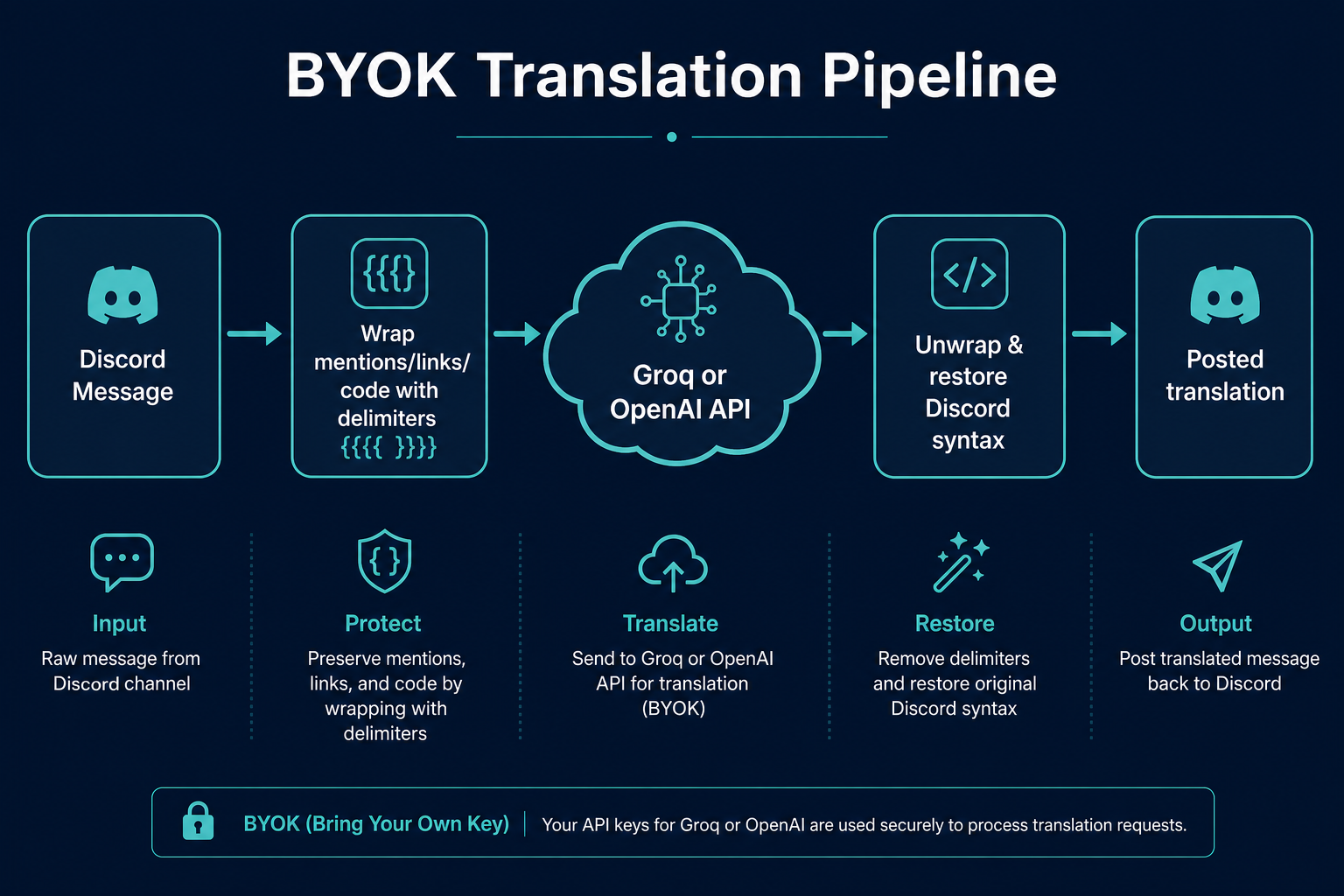
BYOK translations run through a protection layer before the LLM sees your text. Sensitive Discord syntax is wrapped so the model does not alter it.
Default wrappers: {{{{ … }}}}
You can customize open/close markers (1–16 characters each, must differ).
Protected content includes:
- User and role mentions
- Channel mentions
- URLs and markdown links
- Custom emoji
- Spoilers and code blocks
- Terms on your translation blacklist
flowchart LR
    A[Original message] --> B[Wrap protected segments]
    B --> C[LLM translation]
    C --> D[Unwrap & restore syntax]
    D --> E[Posted translation]
User delimiters apply to personal BYOK translations. Guild delimiters apply when the guild BYOK engine is active.
Security
- API keys are encrypted before storage
- Audit logs record key updates but never the key value
- Use restricted API keys from your provider when possible
- Rotate keys if a staff member with dashboard access leaves
Troubleshooting
| Issue | What to check |
|---|---|
| Translations fall back to self-hosted | Premium expired, key missing, or invalid key |
401 / auth errors in error logs | Regenerate API key at provider |
| Model not found | Model name must match provider's current model list |
| Mentions broken in output | Verify delimiter settings; avoid markers that appear in normal text |
| High API costs | Lower max tokens; use Groq for high-volume servers |
AI profiles
AI profiles let you save reusable BYOK presets (engine, model, prompt, optional API key) and assign them to mirrors, default-language channels, flag reactions, and the Translate context menu. Delimiters and extended sampling parameters still come from the main BYOK settings described above.